Coffee Golf
- 4.0
- Rating
- 500.00K
- Installs
- Free
- Price

 Analysis by App-foxy
I did not expect a golf game built around coffee-break sessions to hold my attention for long, but Coffee Golf has a clever way of making a tiny amount of play feel meaningful. It is a free sports game from Shallot Games, LLC, built around a daily golf challenge rather than a full simulation. I can open it, take a few shots, and leave without feeling that I have started a huge commitment. That simple rhythm is the main reason I would recommend trying it.
The important distinction is that this is not aiming to replace a detailed golf simulator. It is better understood as a compact daily puzzle with golf controls. The appeal comes from planning a route, judging risk, and trying to improve a previous result. That makes it suitable for people who enjoy short challenges, while players looking for realistic clubs, courses, tournaments, or long career progression should set their expectations differently.
How Coffee Golf feels to use in everyday play
I find the everyday appeal comes from treating each round as a small decision-making exercise, not something I need to rush through. A useful approach is to look over the hole before touching the controls, then make one deliberate shot choice at a time; that helps separate a considered miss from a hurried one. This section also looks at when that measured rhythm fits best, and where its limits become more noticeable.
You May Also Like

 Blood Strike: 2.5 Anniversary
Blood Strike’s Loadouts Turn Every Drop Into a Tactical Gamble
A close look at Blood Strike’s custom loadouts: how fast access to signature weapons reshapes its battle royale rhythm, rewards preparation, and narrows the gap between fights.

 Pandora - Music & Podcasts
Pandora’s Music Is Easy to Start, but Harder to Recover
Pandora’s strength is its low-effort path from a seed to a station. Its weak spot is how much confidence it asks you to place in connection, setup, and quiet recovery.

 8 Ball Pool
 Is Built on Rivalries, Rematches, and Routine
A close look at the rivalries, rematches, shared routines, and unanswered safety questions that turn a quick pool match into a persistent mobile community.

 Samsung Music
’s Quiet Strength Is Playing What You Already Own
Its reach comes less from spectacle than from dependable access to a personal library. That simplicity is both the app’s strongest retention engine and its ceiling.

 AccuWeather: Weather Radar
AccuWeather Review: A Quick, Clear Forecast for Everyday Decisions
For everyday plans, the best forecast is the one you can understand quickly. AccuWeather makes rain timing, radar, and local conditions easy to act on, with a few trade-offs.

 Hill Climb Racing
Why Hill Climb Racing Still Turns Crashes Into One More Run
A tiny car, a bumpy hill and one more upgrade: Hill Climb Racing keeps resurfacing because its simple chaos makes every near-miss feel personal.
More From Our News Desk



Readability and navigation during a quick round
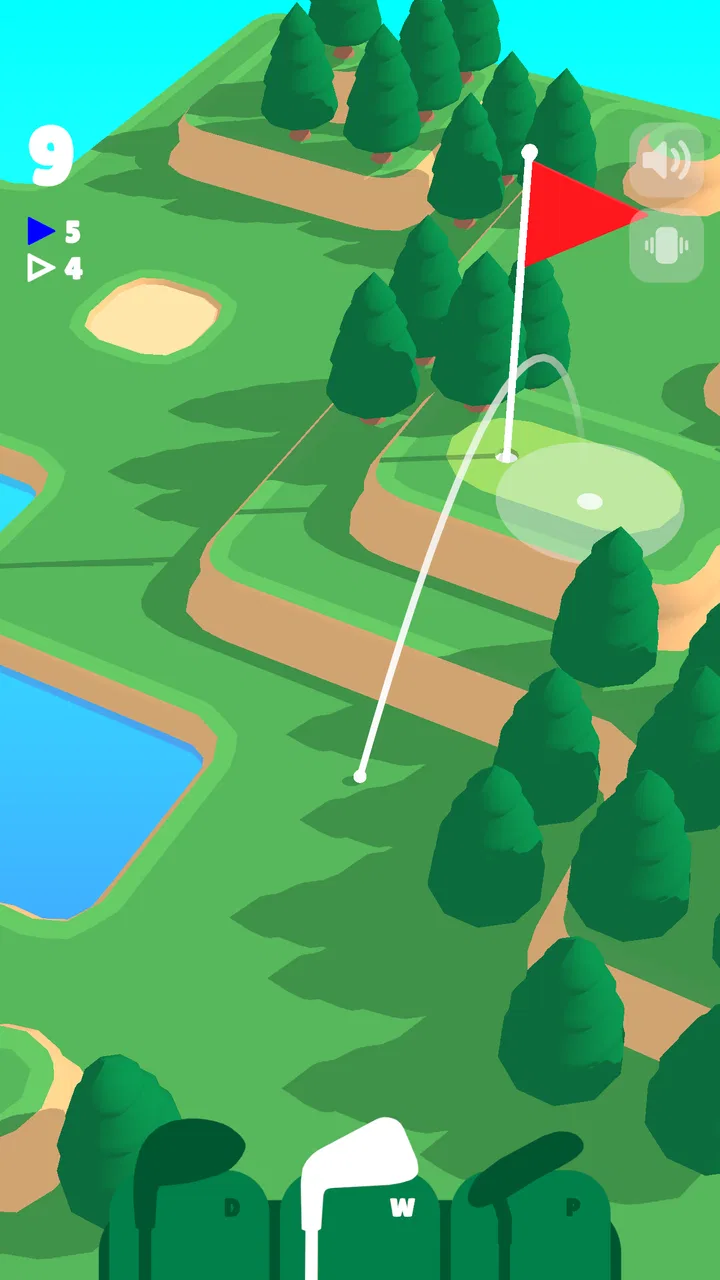
The strongest part of the experience is its immediate clarity. I can understand the basic goal quickly: look at the hole, choose a direction, set the strength of the shot, and try to finish efficiently. The compact presentation keeps the focus on the course instead of surrounding the play with menus and statistics. For a game designed around a daily challenge, that restraint works well.
The short sessions also make navigation less tiring than in many larger sports games. I do not have to move through a complicated career screen before reaching the next meaningful decision. The central interaction is visible, and the game’s small scale means I spend more time thinking about the shot than searching for an option. That is particularly helpful when I am playing during a commute, while waiting for an appointment, or between other tasks.
Still, visual simplicity is not the same as universal readability. Golf requires judging distance, angles, obstacles, and the relationship between the ball and the target. A player with reduced vision may find those small spatial details harder to interpret, especially on a phone held at a distance. I found that playing with the device closer and increasing the general display size where the operating system allows it can make the course easier to inspect, although that is a device-level adjustment rather than a special game feature.
The game’s clean look can also make some information feel understated. That is attractive when I want a calm interface, but it means I need to pay attention rather than glance casually at the screen. If you prefer oversized labels, strong visual signposting, or a highly guided tutorial, this may feel less accommodating than a more conventional sports title.
One useful habit is to pause before every shot instead of treating the game like a reflex challenge. I look at the whole hole, identify where a miss would leave me, and then decide whether the safest route is better than the most ambitious one. This turns the small screen into an advantage: there are fewer distractions, so the course itself becomes the puzzle.
Motor demands and sensory comfort
The controls are approachable because they center on a single shot decision rather than a long sequence of buttons. I do not need the coordination required by a console golf game with several timing stages, camera controls, and club changes. That makes Coffee Golf a reasonable option for someone who wants a sports game with a lighter control burden.
However, “simple” does not mean effortless for every player. Aiming and setting shot strength still require controlled touch input. Players with tremors, limited finger movement, or difficulty making precise gestures may find the final adjustment frustrating. The game’s short format helps because a round does not demand prolonged physical effort, but a delicate shot can still be a barrier when accuracy depends on a small movement.
I also think about sensory load differently here than I would with an action game. The pace is generally calmer, and the golf format does not require constant rapid reactions. That can suit players who avoid noisy, hectic sports games. At the same time, the need to inspect a compact course may create visual strain for people who have trouble with small objects, subtle contrasts, or changing backgrounds. Taking breaks is sensible, especially when repeated attempts turn into an effort to correct tiny aiming errors.
There is a practical workaround for motor difficulty: use a stable grip, rest the phone on a surface, and make the shot from a supported position rather than holding the device in one hand. That will not change the touch interaction, but it reduces accidental movement. I also prefer playing with one finger and avoiding hurried corrections. The game rewards deliberate input more than frantic tapping.
For players who experience discomfort from motion or visual effects, the compact course view is less overwhelming than a camera that constantly swings around a large 3D stadium. I would still test it personally, because comfort varies widely, but the basic structure feels more controlled than spectacle-driven sports games. The game’s appeal is in decision-making, not sensory intensity.
Where the daily format fits different situations
The daily structure is especially good for people who want a repeatable routine. I can make it part of a morning coffee, a short break at work, or a wind-down ritual before bed. Because the challenge is limited, it does not demand the uninterrupted time that a full round in a realistic golf game usually needs. I can stop after a few attempts and return later without losing the basic point of the experience.
That convenience has an important social side. Someone who cannot dedicate an hour to a game can still participate in a shared habit with friends or family who enjoy comparing their approach to the same challenge. The game is also approachable for people who do not know golf terminology well, because the central question is practical: where should I send the ball, and how much risk am I willing to take?
It works less well when I want a game to fill a long journey or provide a deep evening session. The daily concept gives Coffee Golf its identity, but it also limits the amount of content I can consume at once. If I have already solved the challenge and want a large selection of courses, a traditional golf game will probably offer more variety. This is a title for a small, repeatable dose rather than an endless campaign.
It is also worth considering the setting in which you play. On public transport, a compact challenge is convenient, but a moving vehicle can make precise touch input harder. In a noisy environment, the visual focus may be useful, although I would not rely on sound alone to understand what is happening. In bright outdoor light, screen glare can make course details more difficult to read, so shade or a higher device brightness may matter more than expected.
For younger players, the Everyone content rating makes the game broadly suitable as a family-friendly option. I would still pay attention to how in-app purchases are handled on the device, since the game is free to start but includes individual purchases ranging from under a dollar to amounts approaching fifty dollars. That does not automatically make the game unsuitable, but families should use the operating system’s purchase controls if a child will play independently.
What the game does well for inclusive play
Its biggest inclusive strength is the low commitment. I do not need specialist golf knowledge, a powerful device, or a large block of free time to understand the basic appeal. The game’s sports category is presented through a puzzle-like interaction, which opens the door to players who normally avoid simulations. Someone who likes logic games but has never cared about golf can still enjoy planning a clean route.
The low-pressure pace also gives players room to experiment. I can try a safer shot, learn from the result, and attempt a more efficient line without being pushed through a long match. That matters for people who need extra time to process a visual layout or who prefer learning by repetition. The daily challenge creates a clear boundary, while repeated attempts provide a reason to refine technique.
Another strength is that the game makes skill feel connected to observation rather than speed. I am not rewarded simply for tapping quickly. I need to read the terrain, estimate the consequences, and accept that the clever-looking shot may be less reliable. That design can be more welcoming to players who are uncomfortable with fast reaction tests, even though precise touch control remains important.
There is also a useful distinction between competitive pressure and personal improvement. I can treat the challenge as a private puzzle and focus on making a better decision than I made previously. For some players, that is more comfortable than a live multiplayer match where mistakes are immediately visible. The game’s compact format supports a quiet, self-directed style of play.
Remaining barriers and trade-offs
The main barrier is the absence of a clearly adjustable control style for every ability. I can make the existing interaction easier through posture, grip, and device settings, but those are personal workarounds. A player who cannot perform accurate touch gestures may still be locked out of the game’s central skill. This is the point where a slower, button-based golf game or a title with broader control customization could be a better choice.
Visual interpretation is another trade-off. The game is readable in broad terms, but golf depends on details. If you have difficulty distinguishing small course elements, judging a shot may become tiring even when the menus themselves are easy to understand. A larger tablet could help, but the experience is still built around looking carefully at a course rather than receiving every important detail through large text or spoken guidance.
The free entry point is convenient, but the presence of in-app purchases deserves a deliberate approach. I would not hand the device to a child without purchase restrictions, and I would avoid assuming that “free” means the entire experience is free of spending prompts. For adults, the sensible approach is to play the opening experience first and decide whether any optional purchase adds enough value for your habits.
There is also a motivational limitation. Daily games can become part of a routine, but they may feel repetitive to players who need a large progression system. If you want unlockable equipment, a detailed player profile, realistic course management, or a long-term competitive ladder, this game’s focused design may seem thin. Its restraint is a benefit for short sessions and a weakness for players seeking depth.
Device compatibility is relatively broad because the game supports Android versions beginning with 8.0, but that does not guarantee identical comfort on every phone. Screen size, touch sensitivity, brightness, and performance can all affect how pleasant a precision game feels. Before judging the controls, I would try it on the device you actually plan to use rather than assuming the experience will match a larger or newer phone.
How it compares with ordinary golf alternatives
Compared with a full golf simulation, Coffee Golf is faster to understand and easier to fit into a busy day. A simulator usually wins on realism, career depth, equipment choices, and the feeling of playing a complete round. Coffee Golf wins when I want one focused decision after another without committing to a long session or learning a large control system.
Compared with arcade sports games, it is calmer and more deliberate. Many arcade titles depend on dramatic presentation, rapid reactions, or a strong sense of spectacle. Here, the satisfaction comes from finding an efficient solution. That makes it a better match for a player who enjoys puzzles and optimization, but a weaker match for someone who wants energetic crowds, licensed athletes, or a traditional match atmosphere.
It also differs from casual time-killers that offer an endless stream of unrelated levels. The daily challenge gives the game a shared rhythm and a reason to return, but it can restrict the amount of fresh play available in one sitting. I see that as an intentional trade-off rather than a flaw: the game is designed to become a small daily habit, not a replacement for every other game on a phone.
My most practical advice is to decide what kind of golf experience you want before installing it. If you want a thoughtful five-minute puzzle with a sports theme, this is a strong fit. If you want a complete golfing hobby in digital form, start with a simulator instead. Choosing based on that distinction will prevent most disappointment.
Who should try it, and who should skip it
I would recommend Coffee Golf to people who like daily puzzles, compact sports games, and challenges that reward a second look. It is a good choice for a commuter, a casual player who dislikes complicated controls, or a golfer who wants a quick mental warm-up rather than a realistic round. It can also suit families looking for a broadly age-appropriate game, provided purchase controls are configured responsibly.
I would be more cautious if precise touch input is difficult for you, if small visual details cause fatigue, or if you need extensive accessibility settings to make a game comfortable. The title may still be playable with a supported grip and device adjustments, but I would not describe those workarounds as a substitute for dedicated control and presentation options.
Players who skip short daily formats should also look elsewhere. The game does not make sense as a primary choice for someone seeking a long campaign, extensive customization, or a realistic golf career. Its value comes from focus and repetition, so a person who sees those qualities as limitations will probably prefer a larger sports game.
My final take after living with the daily challenge
Coffee Golf is at its best when I treat it as a small daily puzzle, not as a miniature golf simulator. The free entry, approachable sports theme, and quick decision-making make it easy to recommend to casual players. Shallot Games, LLC has kept the central idea focused enough that I can understand the appeal immediately and return without relearning a complicated system.
The audience response is encouraging without making the game seem universally perfect: it holds an average rating of 4.0 from around 7,100 ratings, with more than 700 written reviews and over 500,000 installs. Those figures fit my impression of a well-liked, focused game whose appeal depends heavily on whether the daily format matches your habits.
The current version is 2.5.1, and the game was released on June 2, 2023. I appreciate that the basic experience is free, but I would keep the in-app purchase range in mind and use device restrictions where appropriate. That is especially important when the phone is shared with children or when you prefer completely predictable spending.
For accessibility, my verdict is mixed but positive. The calm pace, limited control vocabulary, and short sessions reduce several common barriers, while precise touch aiming and compact visual details remain real obstacles for some players. I would recommend testing it with your preferred grip, screen size, and display settings rather than relying on a general assumption that simple controls will suit everyone.
In the end, I would install it for a coffee break, a quiet commute, or a few minutes when I want a challenge that does not demand my whole evening. I would choose another game for realistic golf, extensive progression, or stronger control customization. Within its narrower goal, though, Coffee Golf is an appealing little sports puzzle: easy to start, satisfying to refine, and most enjoyable when I let the daily challenge stay small.
FAQs for Coffee Golf
01What is Coffee Golf, and how does it work?
Coffee Golf is a casual mobile game that combines the relaxing elements of coffee culture with the challenge of golf. Players navigate courses with simple swipe controls to aim and shoot, making it accessible for all ages. The game features daily challenges, allowing users to play quick rounds with friends or solo.
02Is Coffee Golf available on both Android and iOS?
Yes, Coffee Golf is available for download on both Android and iOS devices. You can find the app on the Google Play Store for Android users and the Apple App Store for iOS users. Ensure your device meets the minimum system requirements for the best gaming experience.
03Does Coffee Golf offer in-app purchases?
Coffee Golf includes in-app purchases that allow players to enhance their gaming experience. These purchases can range from cosmetic items to additional game features. While the game is free to play, spending is entirely optional and not necessary to enjoy the full experience.
04Can I play Coffee Golf offline?
Coffee Golf offers an offline mode, allowing players to enjoy the game without an internet connection. However, some features, such as daily challenges and multiplayer modes, require an internet connection to function. Offline play is perfect for those on the go or in areas with limited connectivity.
05What kind of updates does Coffee Golf receive?
Coffee Golf receives regular updates that include new courses, challenges, and seasonal events. The developers are committed to enhancing the game based on player feedback, ensuring fresh content and improved gameplay. Updates may also address bugs and introduce new features to keep the experience engaging.
Pros
- Simple and intuitive controls.
- Charming and minimalistic design.
- Quick games for short breaks.
- Addictive gameplay mechanics.
- Free to play with optional upgrades.
Cons
- Limited level variety.
- Occasional in-app ads.
- No multiplayer mode.
- Requires internet connection.
- Lack of detailed tutorials.

Coffee Golf
Gallery